Studio visual workspace#
Studio is phase-free: the board, Properties inspector, testing tools, files, source, and assistant remain part of one workspace. You decide the next action instead of advancing through Creator phases.
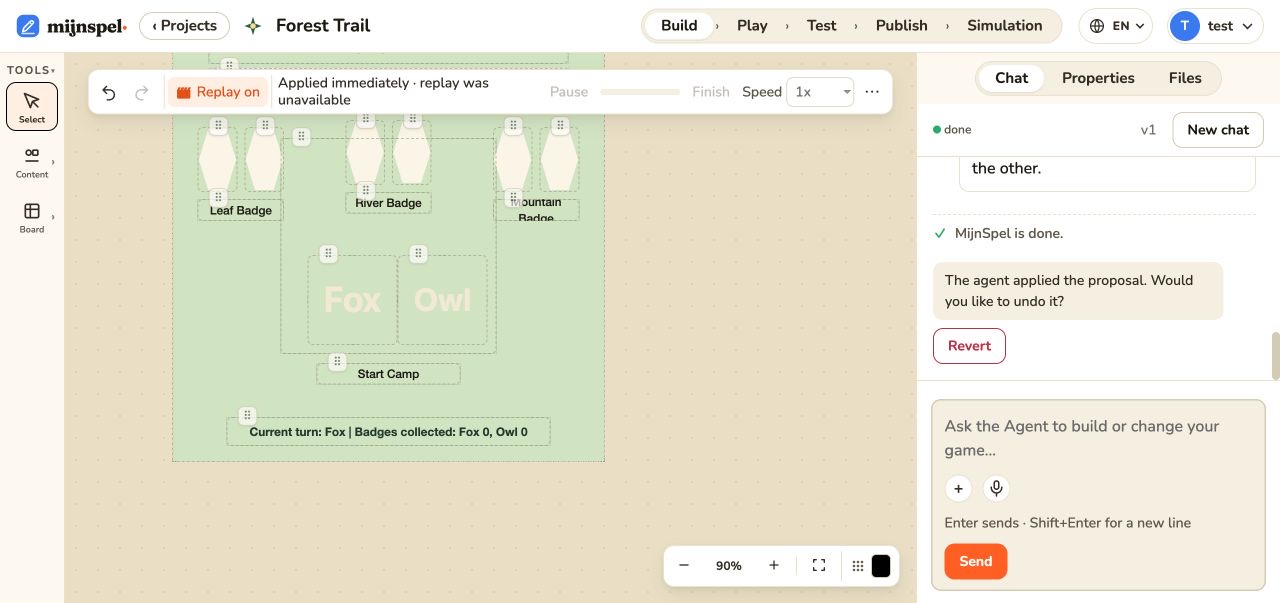
Build on the board#
Use Build mode to select and arrange tokens, cards, decks, labels, notes, HUDs, and widgets. Separate board tools create zones, slots, grids, hex grids, and circular tracks. Selection handles support the transformations exposed for that element. Multi-selection and touch behavior depend on the current tool and element capability. The same game definition drives edit and play rendering, so always check WYSIWYG fidelity in Play. See Elements and Properties.
Edit Properties#
Select an element to edit its supported Properties: identity, ownership, placement, dimensions, appearance, content, and element-specific behavior. The inspector is schema-driven; fields not shown for an element are not supported through that surface. Give stable, meaningful IDs to elements that game logic needs to address.
Use editor tools safely#
Use zoom and canvas navigation to reach crowded areas, duplicate or delete selected elements where offered, and undo or revert through the available history controls. A visual move changes the authored definition immediately; test after structural edits such as slot ownership, containment, rotation, or overlays. Editor actions and history lists keyboard, clipboard, board JSON, and undo behavior.
Work with the phase-free agent#
Ask the Studio Agent for one concrete outcome and describe how to verify it. The agent may ask a checklist question before acting. Requests enter a queue; review progress and technical details without sending conflicting edits. Valid proposals are applied automatically before review. Replay shows the visual change; Approve continues the checklist and does not apply it again. Revert restores the preceding board as one undoable change. See Review, replay, approve, and revert.
Files, source, and assets#
Files lists supported project artifacts; assets can be uploaded through the UI and referenced by the game. Source is read-only and is meant for inspecting generated code and definitions. Prefer Properties for supported board changes because it preserves the schema, or ask the Agent for code changes. Studio files, assets, and Source covers previews, downloads, renaming, deletion, and in-use safeguards. Never paste credentials or private URLs into game files.